
YorkU Course Enrollment Redesign
Context
Redesigning York University's course enrollment system to make it easier for students to discover, plan, and enroll in courses.
Role
UX Researcher
UX/UI Designer
duration
4 Weeks
Tools
Figma
Teams
Cindy Yin (me)
Adrienne Luong
Summary
Why Redesign? (Problem)
Course enrollment was unnecessarily complicated
Students had to move between multiple systems throughout the enrollment process, often spending extra time double-checking information and manually transferring course details. This created unnecessary frustration and increased the likelihood of mistakes during registration, leading many students to rely on external resources or Youtube just to navigate the process.
Solution
A Unified Course Enrollment Experience
We redesigned the enrollment process around a continuous journey from course discovery to registration. Courses selected during browsing carry seamlessly into schedule planning and enrollment, reducing repetitive tasks and eliminating the need to repeatedly enter information across systems.
Impact
Unified 3+ enrollment tools into a single experience, reducing repetitive searches and manual information transfer throughout the process.
RESEARCH & INSIGHTS
Research methods
To better understand the enrollment experience, we conducted surveys, interviews, and firsthand walkthroughs of the system.
20 students surveyed
2 interviews
1 observation of the enrollment process
SURVEY RESULTS

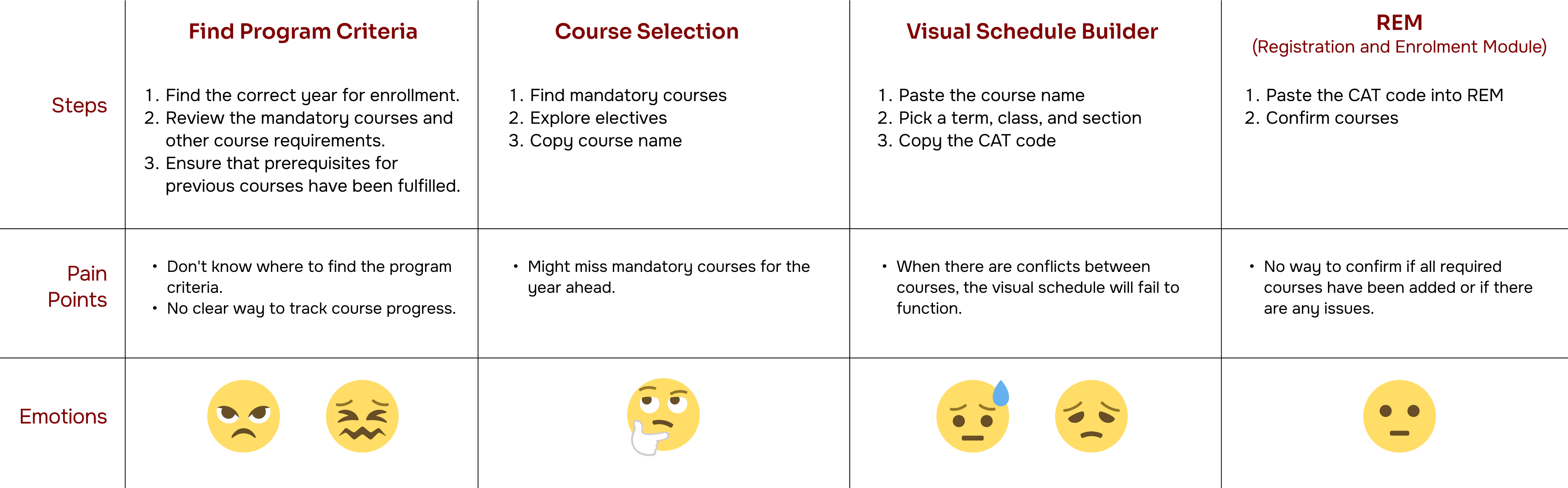
CURRENT ENROLLMENT JOURNEY
Pain Points
Repeated Work
Students frequently searched for the same course information across multiple systems, as selections made in one tool did not carry over to the next.
Manual Information Transfer
Course details and enrollment codes had to be manually carried between systems, increasing effort and the likelihood of mistakes.
Limited Course Insights
Students often relied on external resources such as Reddit and RateMyProf to evaluate courses before enrolling.
Disconnected Experience
Course browsing, schedule planning, and registration existed in separate systems with little continuity between them.
Design Goals
Design Challenge
How might we simplify course enrollment while helping students make more informed decisions?
Design Priorities
Based on our research findings, we identified three key goals that would guide the redesign and help address the most common frustrations students experienced throughout enrollment.
Reduce Repetition
Students should only need to find information once.
Keep Information Connected
Course selections should carry throughout the enrollment process.
Support Better Decisions
Students should have access to relevant course insights when enrolling.
EARLY EXPLORATION
Sketches

Low Fidelity

USER TESTING
final design
We conducted usability testing with 10+ York University students to evaluate the redesigned enrollment experience. Participants were asked to enroll in a set of courses while sharing their thoughts and feedback throughout the process.

Homepage
What Worked
Cleaner and easier to understand
Less overwhelming than the original system
Needed Improvement
3-step process wasn't obvious enough
Still felt like a collection of links
Course Browser
What Worked
Grid layout made courses easier to browse and compare
Multiple filters helped students narrow down results quickly
Suggested and mandatory courses helped students discover relevant classes
Needed Improvement
Users expected a quick way to return to the top of the page
The course selection panel was not immediately recognizable

Visual Calendars Builder
What Worked
Easy to compare different schedule options
Scheduling conflicts were easy to spot
Course progress helped students identify remaining graduation requirements
Needed Improvement
Ability to pin important courses while comparing schedules
Clearer visual distinction between courses, such as colour coding

Registration and Enrolment Module
What Worked
Consistent design made the enrollment process feel connected.
Familiar layouts reduced the learning curve between pages.
Needed Improvement
The tags felt unnecessary
final design
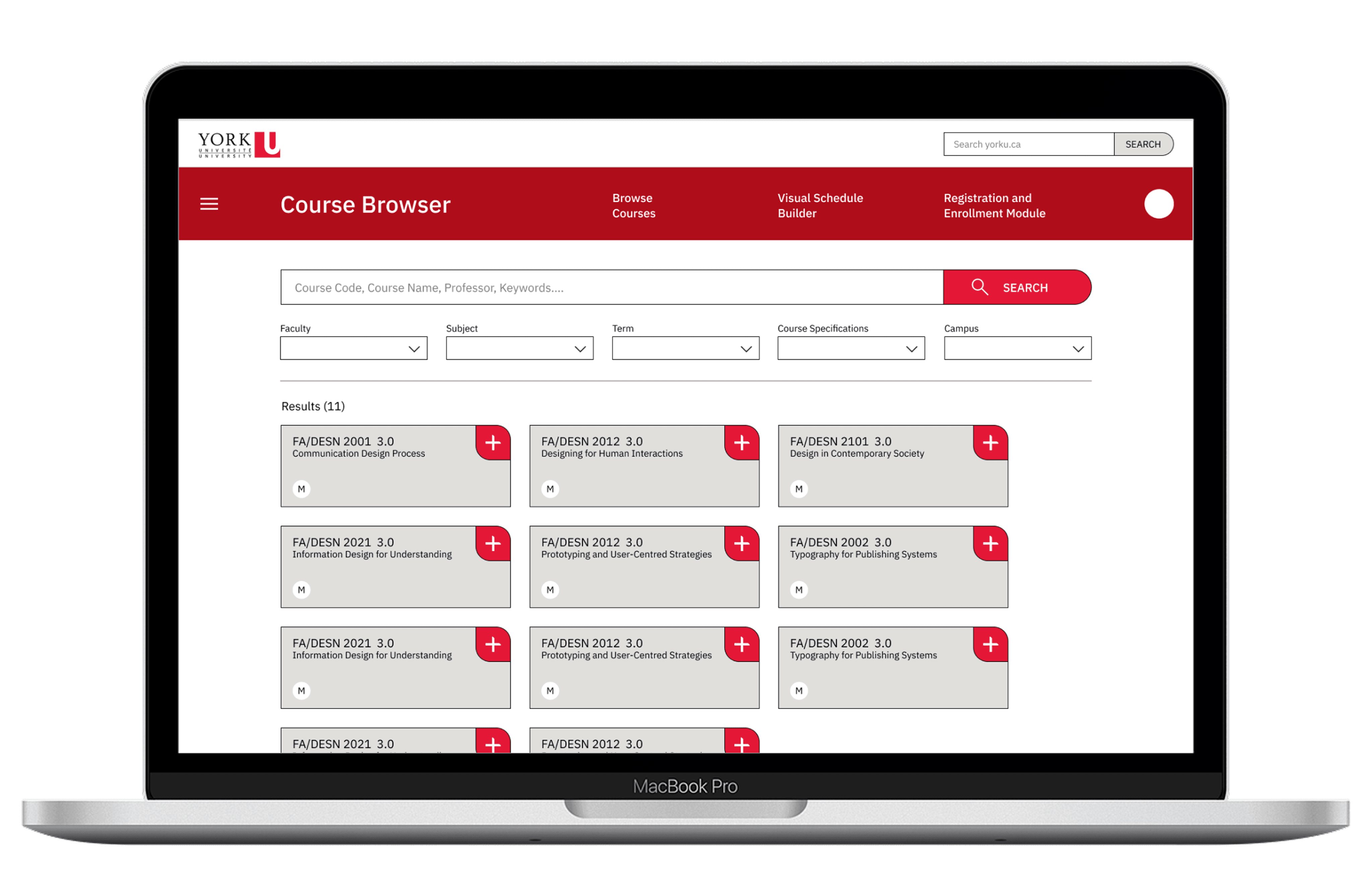
Homepage
Brings course browsing, schedule planning, and enrollment into one place, making it easier for students to access everything they need quickly.
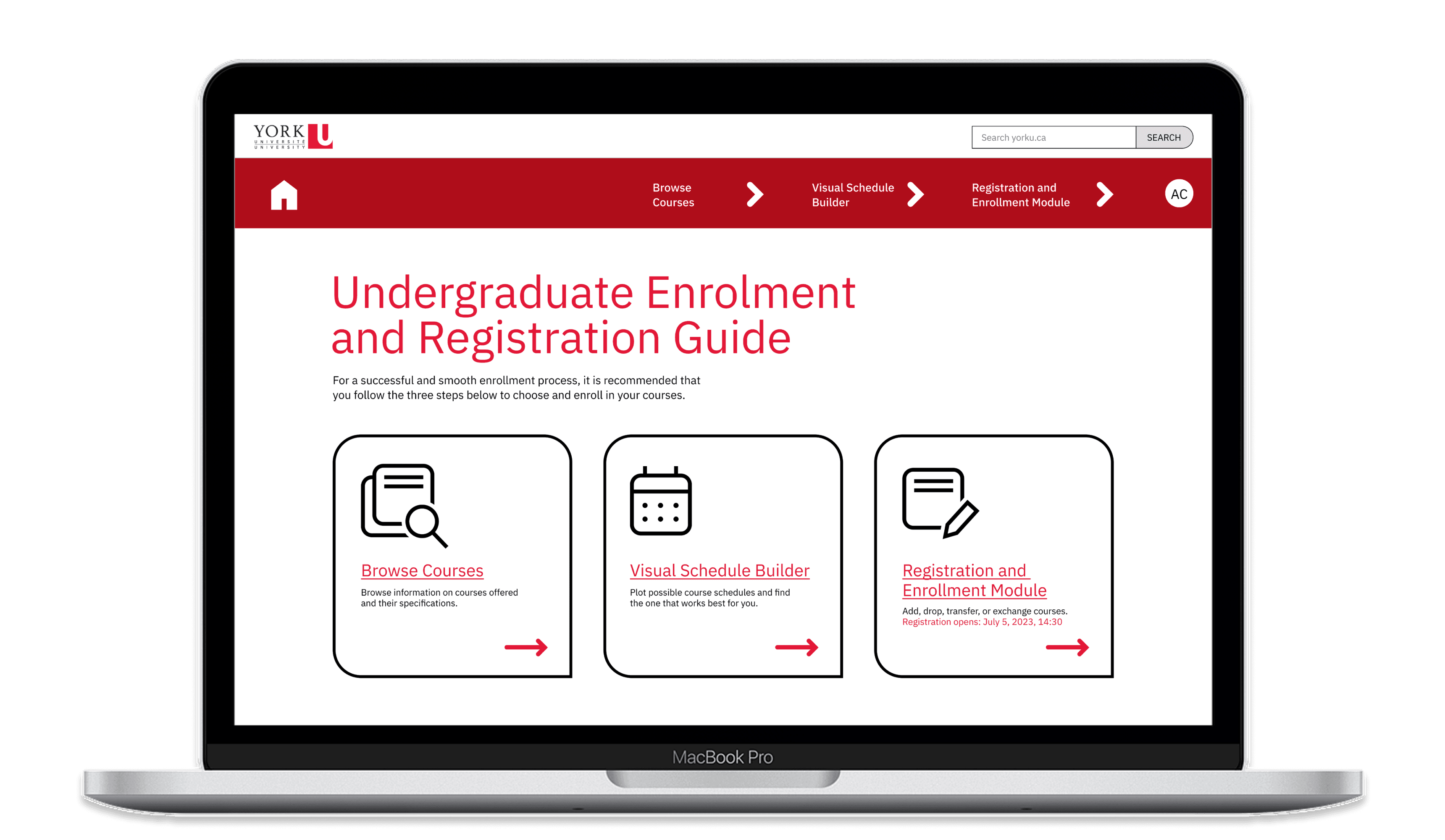
Course Browsing
Combines personalized recommendations, search, and advanced filtering into a more streamlined course browsing experience. Users can quickly explore and add courses relevant to their academic progress.

Course Selection Panel
Displays selected courses in a side panel, making it easy to review and manage selections while browsing. Recently deleted courses can be quickly recovered if needed.

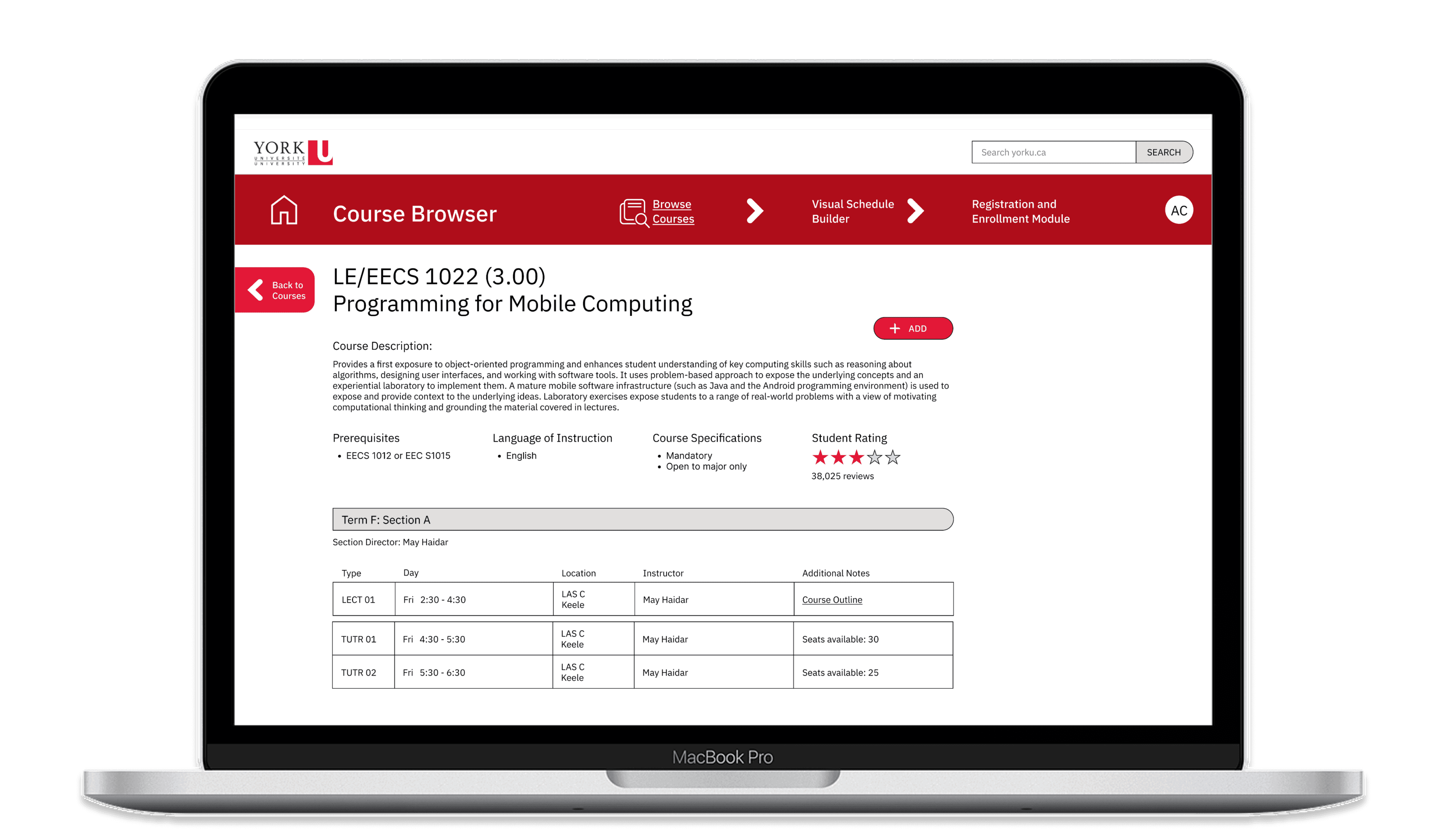
Course Details
Shows course information including descriptions, ratings, prerequisites, and available lecture sections. Users can review course content and scheduling information before adding courses to their selection.
Visual Schedule Builder
Allows users to build and customize their schedules by selecting lecture sections and viewing all possible timetable combinations. Conflicts are automatically detected, while pinned courses and flexible selections help users create schedules that fit their needs.

Registration and Enrolment Module
Review all changes made in the Visual Schedule Builder before final enrollment confirmation. Users can review, modify, or drop selected courses without needing to transfer course codes between separate systems.

What I Learned...
This experience taught me to think beyond individual screens and consider how people, processes, and timing work together. Solving the challenge wasn't just about creating interfaces, but coordinating an entire judging operation.
Future Opportunities
⭐
Course Selection Beyond Requirements
Explore how additional course insights could be incorporated into the experience such as workload, difficulty, and student experiences.
🎓
Bringing More Personality
Finds ways to make program requirements easier to access throughout the enrollment process, helping students feel more confident that they are on track for graduation.
Check out these Projects!

YorkU Course Enrollment Redesign
Context
Redesigning York University's course enrollment system to make it easier for students to discover, plan, and enroll in courses.
Role
UX Researcher
UX/UI Designer
duration
4 Weeks
Tools
Figma
Teams
Cindy Yin (me)
Adrienne Luong
Summary
Why Redesign? (Problem)
Course enrollment was unnecessarily complicated
Students had to move between multiple systems throughout the enrollment process, often spending extra time double-checking information and manually transferring course details. This created unnecessary frustration and increased the likelihood of mistakes during registration, leading many students to rely on external resources or Youtube just to navigate the process.
Solution
A Unified Course Enrollment Experience
We redesigned the enrollment process around a continuous journey from course discovery to registration. Courses selected during browsing carry seamlessly into schedule planning and enrollment, reducing repetitive tasks and eliminating the need to repeatedly enter information across systems.
Impact
Unified 3+ enrollment tools into a single experience, reducing repetitive searches and manual information transfer throughout the process.
RESEARCH & INSIGHTS
Research methods
To better understand the enrollment experience, we conducted surveys, interviews, and firsthand walkthroughs of the system.
20 students surveyed
2 interviews
1 observation of the enrollment process
SURVEY RESULTS
CURRENT ENROLLMENT JOURNEY
Pain Points
Repeated Work
Students frequently searched for the same course information across multiple systems, as selections made in one tool did not carry over to the next.
Manual Information Transfer
Course details and enrollment codes had to be manually carried between systems, increasing effort and the likelihood of mistakes.
Limited Course Insights
Students often relied on external resources such as Reddit and RateMyProf to evaluate courses before enrolling.
Disconnected Experience
Course browsing, schedule planning, and registration existed in separate systems with little continuity between them.
Design Goals
Design Challenge
How might we simplify course enrollment while helping students make more informed decisions?
Design Priorities
Based on our research findings, we identified three key goals that would guide the redesign and help address the most common frustrations students experienced throughout enrollment.
Reduce Repetition
Students should only need to find information once.
Keep Information Connected
Course selections should carry throughout the enrollment process.
Support Better Decisions
Students should have access to relevant course insights when enrolling.
EARLY EXPLORATION
Sketches
Low Fidelity
USER TESTING
final design
We conducted usability testing with 10+ York University students to evaluate the redesigned enrollment experience. Participants were asked to enroll in a set of courses while sharing their thoughts and feedback throughout the process.
Homepage
What Worked
Cleaner and easier to understand
Less overwhelming than the original system
Needed Improvement
3-step process wasn't obvious enough
Still felt like a collection of links
Course Browser
What Worked
Grid layout made courses easier to browse and compare
Multiple filters helped students narrow down results quickly
Suggested and mandatory courses helped students discover relevant classes
Needed Improvement
Users expected a quick way to return to the top of the page
The course selection panel was not immediately recognizable
Visual Calendars Builder
What Worked
Easy to compare different schedule options
Scheduling conflicts were easy to spot
Course progress helped students identify remaining graduation requirements
Needed Improvement
Ability to pin important courses while comparing schedules
Clearer visual distinction between courses, such as colour coding
Registration and Enrolment Module
What Worked
Consistent design made the enrollment process feel connected.
Familiar layouts reduced the learning curve between pages.
Needed Improvement
The tags felt unnecessary
final design
Homepage
Brings course browsing, schedule planning, and enrollment into one place, making it easier for students to access everything they need quickly.
Course Browsing
Combines personalized recommendations, search, and advanced filtering into a more streamlined course browsing experience. Users can quickly explore and add courses relevant to their academic progress.
Course Selection Panel
Displays selected courses in a side panel, making it easy to review and manage selections while browsing. Recently deleted courses can be quickly recovered if needed.
Course Details
Shows course information including descriptions, ratings, prerequisites, and available lecture sections. Users can review course content and scheduling information before adding courses to their selection.
Visual Schedule Builder
Allows users to build and customize their schedules by selecting lecture sections and viewing all possible timetable combinations. Conflicts are automatically detected, while pinned courses and flexible selections help users create schedules that fit their needs.
Registration and Enrolment Module
Review all changes made in the Visual Schedule Builder before final enrollment confirmation. Users can review, modify, or drop selected courses without needing to transfer course codes between separate systems.
What I Learned...
This experience taught me to think beyond individual screens and consider how people, processes, and timing work together. Solving the challenge wasn't just about creating interfaces, but coordinating an entire judging operation.
Future Opportunities
⭐
Course Selection Beyond Requirements
Explore how additional course insights could be incorporated into the experience such as workload, difficulty, and student experiences.
🎓
Bringing More Personality
Finds ways to make program requirements easier to access throughout the enrollment process, helping students feel more confident that they are on track for graduation.
Check out these Projects!